Bienvenue sur le site officiel de notre chaine Youtube RV SEO
Soutenez-nous gratuitement : Abonnez-vous et activez la cloche pour avoir les dernières vidéos avant tout le monde! Pensez aussi à mettre un pouce et un commentaire sous les vidéos qui vous ont été utiles
Install n8n – Automatisation de flux de travail open source – sur Windows 10
Qu’est-ce que n8n ?
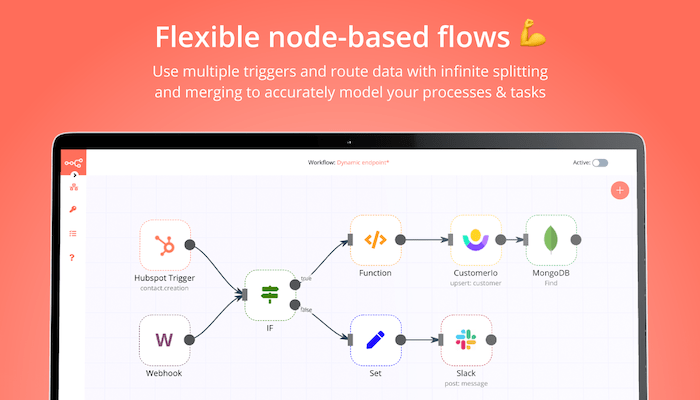
n8n est un outil d’automatisation de flux de travail extensible. Avec un modèle de distribution en code équitable, n8n aura toujours un code source visible, sera disponible en auto-hébergement, et vous permettra d’ajouter vos propres fonctions personnalisées, logiques et applications. L’approche basée sur les nœuds de n8n le rend très polyvalent, vous permettant de connecter n’importe quoi à n’importe quoi. – https://github.com/n8n-io/n8n
Installation de n8n
Prérequis: Windows 10 avec un compte administrateur
# install n8n npm install n8n –location=global # test run n8n npx n8n
By default, the n8n database and configuration file live in the user’s profile .n8n folder (ie C:\Users\i12bretro\.n8n). To utilize a database other than SQLite, setup the database and authentication, then create a .bat file like the example below and call the .bat file as the action of the scheduled task.
Nous utilisons des cookies sur notre site Web pour vous offrir l'expérience la plus pertinente en mémorisant vos préférences et vos visites répétées. En cliquant sur "Accepter tout", vous consentez à l'utilisation de TOUS les cookies.
This website uses cookies to improve your experience while you navigate through the website. Out of these, the cookies that are categorized as necessary are stored on your browser as they are essential for the working of basic functionalities of the website. We also use third-party cookies that help us analyze and understand how you use this website. These cookies will be stored in your browser only with your consent. You also have the option to opt-out of these cookies. But opting out of some of these cookies may affect your browsing experience.
Necessary cookies are absolutely essential for the website to function properly. This category only includes cookies that ensures basic functionalities and security features of the website. These cookies do not store any personal information.
Any cookies that may not be particularly necessary for the website to function and is used specifically to collect user personal data via analytics, ads, other embedded contents are termed as non-necessary cookies. It is mandatory to procure user consent prior to running these cookies on your website.